Back to page
文章摘要
正在思考...
此内容由 AI 自动生成,旨在提供文章要点总结,内容仅供参考
实现思路
最初的想法非常直接,利用正则表达式的捕获组特性,直接精准匹配高亮字段
const text = '这是一段很长的示例文本,实现搜索词高亮'
const search = '文本'

function parseHighlight(text: string, search: string) {
  return text.split(new RegExp(`(${search})`, 'gi')).filter(Boolean)
}

parseHighlight(text, search)
// ['这是一段很长的示例', '文本', ',实现搜索词高亮']
通过这种方式,可以得到一个数组,遍历它并根据内容是否匹配关键词来渲染 mark 标签或者普通的 span 标签
在文章、内容的聚合搜素的场景下,很多时候原始文本可能长达上百字,如果直接渲染全部文本:
- 视觉感染:用户需要翻找很久才能看到匹配点,甚至匹配点直接显示不出来
- 性能负担:过多的 DOM 节点会拖慢页面相应
于是乎,我想到了先 indexOf 一下,定位第一个匹配项的索引 matchIndex,以它为中心向前推进固定长度(prefixOffset),如果前面还有内容,则手动截取补上 ...,代码就变成这样:
const text = '这是一段很长的示例文本,实现搜索词高亮'
const search = '文本'
const prefixOffset = 3

function parseHighlight(text: string, search: string, prefixOffset: number) {
  const lowerText = text.toLowerCase()
  const lowerSearch = search.toLowerCase()

  const matchIndex = lowerText.indexOf(lowerSearch)
  if (matchIndex === -1)
    return [text]

  let displayText = text

  if (matchIndex > prefixOffset) {
    displayText = `...${text.slice(matchIndex - prefixOffset)}`
  }

  return displayText.split(new RegExp(`(${search})`, 'gi')).filter(Boolean)
}

parseHighlight(text, search, prefixOffset)
// ['...的示例', '文本', ',实现搜索词高亮']
返回单纯的字符串数组,使用起来怎么也不得劲,这里我们可以直接做一下处理,把高亮判断逻辑也一起做了:
displayText.split(new RegExp(`(${search})`, 'gi')).filter(Boolean).map(part => ({
  text: part,
  highlight: part.toLowerCase() === lowerSearch,
}))
至此基本功能大致就已经实现,在测试阶段,我发现了两个棘手的问题
- 非法字符注入风险,底层的匹配功能是基于正则表达式的,会导致语法错误
- 匹配
.时,会导致手动补上的...也匹配上,这显然是不合理的
解决思路:
- 在执行表达式之前,把用户传入的
search转义一层,过滤掉非法字符 - 我们在执行匹配之后,再判断是否需要补上
...
代码就变成这样:
function parseHighlight(text: string, search: string, prefixOffset: number) {
  const trimSearch = search.trim()
  const lowerText = text.toLowerCase()
  const lowerSearch = trimSearch.toLowerCase()

  const matchIndex = lowerText.indexOf(lowerSearch)
  if (matchIndex === -1)
    return [{ text, highlight: false }]

  let displayText = text
  let hasPrefix = false

  if (matchIndex > prefixOffset) {
    displayText = text.slice(matchIndex - prefixOffset)
    hasPrefix = true
  }

  const safeSearch = trimSearch.replace(/[.*+?^${}()|[\]\\]/g, '\\$&')
  const splitParts = displayText.split(new RegExp(`(${safeSearch})`, 'gi')).filter(Boolean).map(part => ({
    text: part,
    highlight: part.toLowerCase() === lowerSearch,
  }))

  if (hasPrefix)
    splitParts.unshift({ text: '...', highlight: false })

  return splitParts
}
代码实现
function parseHighlight(text: string, search: string, prefixOffset: number) {
  const trimSearch = search.trim()
  if (!trimSearch)
    return [{ text, highlight: false }]

  const lowerText = text.toLowerCase()
  const lowerSearch = trimSearch.toLowerCase()
  const matchIndex = lowerText.indexOf(lowerSearch)

  if (matchIndex === -1)
    return [{ text, highlight: false }]

  let displayText = text
  let hasPrefix = false

  if (matchIndex > prefixOffset) {
    displayText = text.slice(matchIndex - prefixOffset)
    hasPrefix = true
  }

  const safeSearch = trimSearch.replace(/[.*+?^${}()|[\]\\]/g, '\\$&')
  const splitParts = displayText.split(new RegExp(`(${safeSearch})`, 'gi')).filter(Boolean).map(part => ({
    text: part,
    highlight: part.toLowerCase() === lowerSearch,
  }))

  if (hasPrefix)
    splitParts.unshift({ text: '...', highlight: false })

  return splitParts
}
<script setup lang="ts">
const { text, search, prefixOffset = 3 } = defineProps<{
  text: string
  search: string
  prefixOffset?: number
}>()

const parts = computed(() => parseHighlight(text, search, prefixOffset))
</script>

<template>
  <span>
    <template v-for="(part, i) in parts" :key="i">
      <mark v-if="part.highlight" class="bg-transparent font-bold text-primary underline underline-offset-2">{{ part.text }}</mark>
      <span v-else>{{ part.text }}</span>
    </template>
  </span>
</template>
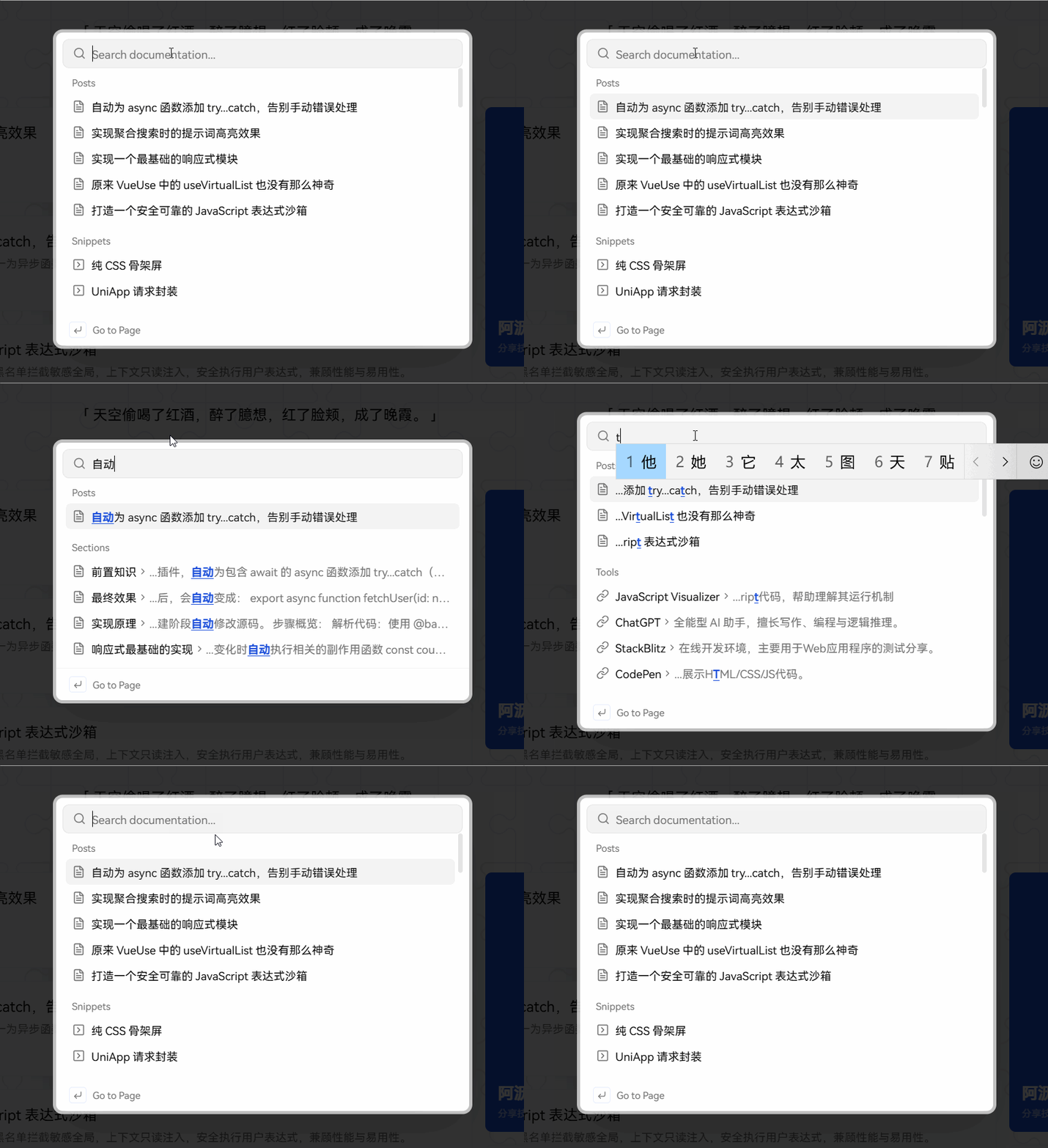
最终效果